How to use an AI chatbot for customer service on your Facebook Page
By Asikaso AI · Published
On this page

An AI chatbot can answer the customers who message your Facebook Page, day and night, in the words they use. Whether it answers them well depends mostly on how you set it up. A chatbot that knows your prices, policies, and limits is helpful. One that guesses is worse than no reply.
This guide walks through the setup in five steps. The approach works with any AI chatbot you connect to your Page. The screens and exact steps shown are from Asikaso AI, so they will look different in another tool.
Asikaso AI is an AI chatbot for Facebook Messenger, Instagram, and websites, built in the Philippines. You add your business information and it answers customers in English, Tagalog, or Taglish. The examples use a sample restaurant called Ember & Oak Bistro.
What an AI chatbot can do for customer service on your Page
Customer service on a Facebook Page is mostly the same questions, asked again and again, at all hours. An AI chatbot for customer service reads each message and answers from the business information you gave it. It is the first reply your customers get, not a replacement for your team.
It handles these well:
- Repeated questions. Prices, hours, location, delivery, and how to book or order.
- Messages after closing time. Customers get an answer at night instead of the next morning.
- Collecting details. It asks for the date, time, item, or address your team needs for a booking or an order.
- Taglish. It replies in the language the customer uses.
It should pass these to a person:
- Complaints, refunds, and replacements
- Requests for discounts or exceptions to your rules
- Anything your team has to check before answering, such as today's stock or a special request
The steps below set up both halves: what the chatbot answers, and what it hands to your team.
Step 1: Choose the questions it should answer
Start with the messages you already get. Open your Page inbox, read the last 50 or so conversations, and write down what customers asked. Most Pages find that a small number of questions make up most of the inbox:
- Prices and what is included
- Opening hours and location
- Delivery areas, fees, and how long delivery takes
- How to book, reserve, or order
- Payment methods
- Changes, cancellations, and refunds
Write each question the way customers type it, including Taglish, such as “Magkano po?” or “Open po ba kayo ngayon?” You will use these exact messages to test the chatbot in step 4.
Then mark the ones that need a person. A question about your hours has one right answer. A complaint about a wrong order needs someone who can check what happened. The chatbot should answer the first kind and pass the second kind to your team.
Step 2: Give it your business information
An AI chatbot answers from the information you give it. If a detail is missing, a good chatbot says it will check with the team. A badly set up one may guess. So the work in this step decides how good the answers are.
Begin with a short description of your business: what you offer, where you are, and who you serve.
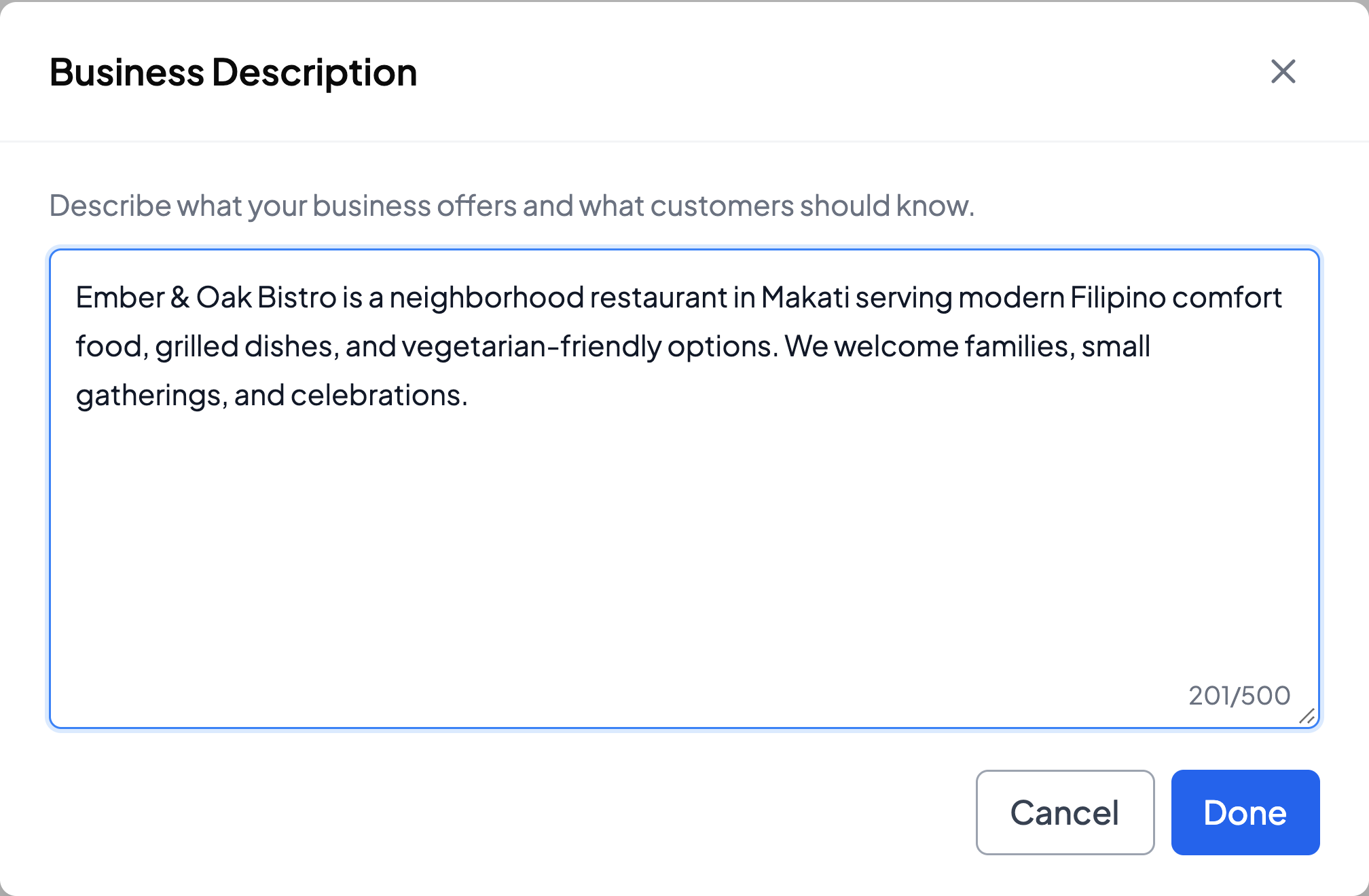
Then add the facts behind each question on your list from step 1. Three habits make these easier for a chatbot to use:
- Keep each topic separate. Give your reservation policy, refund policy, and allergy information each its own entry or section. It is easier to find and update one of them later.
- Write the actual rule. “Tables are held for 15 minutes after your reserved time” can be used in a reply. “We have a late policy” cannot.
- Include the numbers. Prices, fees, hours, and time limits are what customers ask about most.
List your products or services with their prices too. In Asikaso AI these go under Products & Services, so a customer who asks “Magkano po?” gets your current price.
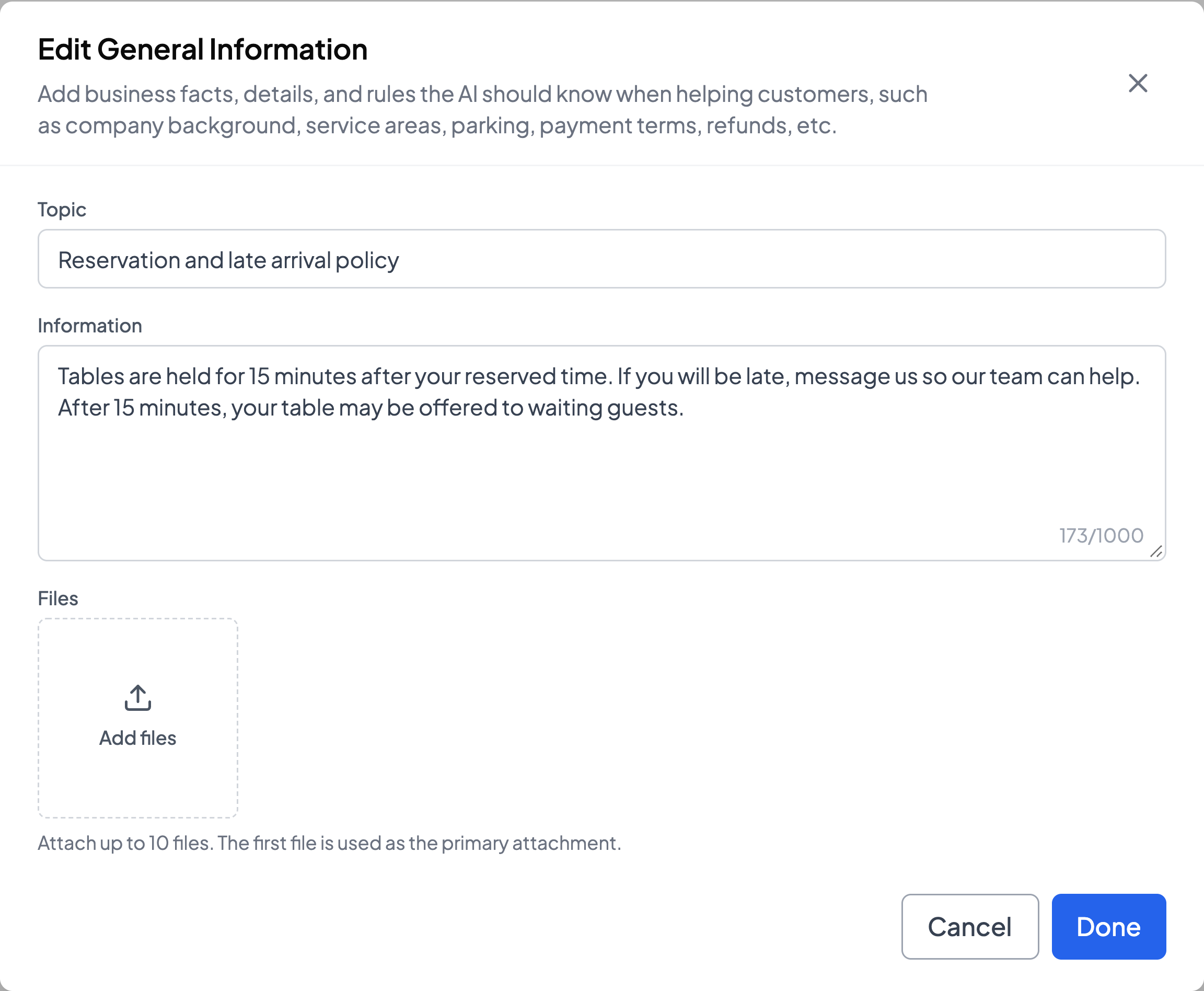
You do not need to write every possible question and answer. The chatbot reads the customer's message and builds the reply from these facts, so the same reservation policy can answer “Hanggang anong oras ninyo hawak ang table?” and “What if we arrive late?”
Whenever a price or policy changes, update it here the same day. An outdated price in the chatbot is an outdated price sent to every customer who asks.
Step 3: Decide what goes to your team
Some conversations should not be finished by a chatbot. Decide in advance which ones, and tell the chatbot what to do when they come up. Common examples:
- Complaints about an order or a visit
- Refund and replacement requests
- Requests for a discount or a special arrangement
- Anything involving health or safety, such as a serious allergy
- A customer who asks to talk to a person
For each one, write a short instruction that says what the chatbot should do and what it must not promise.
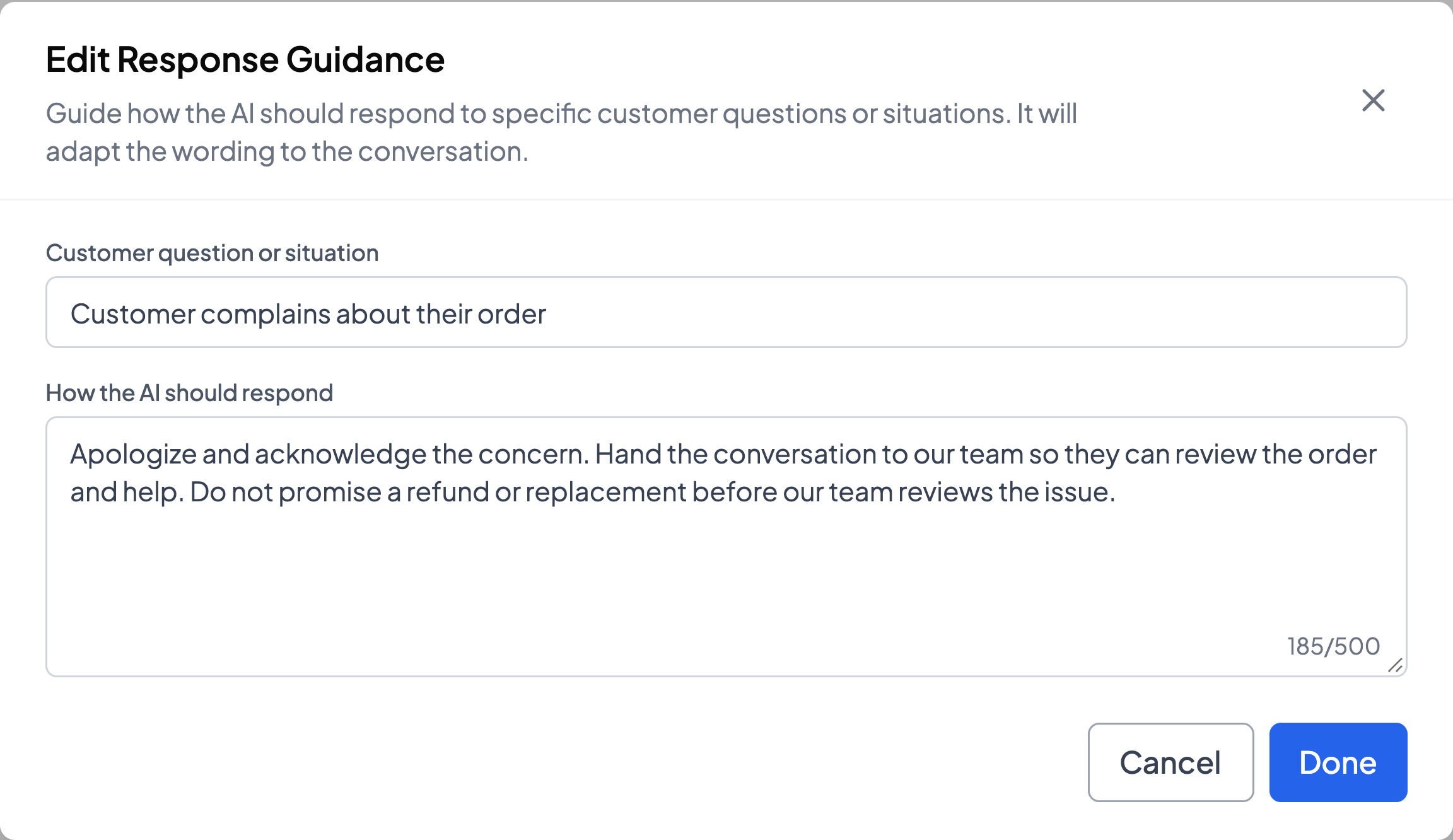
The last sentence of that instruction matters most. Without it, a chatbot trying to be helpful may offer a refund that you have not agreed to. With it, the customer gets an apology and a person.
A handoff only works if someone picks it up. Check two things in whichever tool you use:
- Who gets told. Asikaso AI alerts your team when a customer asks for a person or a question needs human attention.
- What happens when staff reply. In Asikaso AI, the AI pauses in that conversation when you or your team replies, so the customer is not answered by two voices. You choose whether it resumes by hand or after a set time.
Step 4: Test it with follow-up questions
Most chatbots can answer a single clear question. Problems show up on the second and third message, when the customer adds a detail or asks two things at once. Test those before any customer does.
Asikaso AI has a Test Chat where you message the chatbot as a customer would, without touching your live Page. Use the real messages you collected in step 1, and try each of these:
- A Taglish question. Check that the reply is natural and in the same language.
- Two questions in one message. Check that both are answered.
- A follow-up that depends on the last answer. Check that it remembers what was just said.
- Something you never added. Check that it says it will ask the team instead of making up an answer.
- A complaint. Check that it follows your instruction from step 3.
- “Can I talk to a person?” Check that it hands over.
When a reply is wrong, fix the information instead of the reply. A wrong price usually means the price is missing or out of date. A vague answer usually means the rule was written vaguely. Correct the entry, then send the same message again.
Step 5: Turn it on and review real conversations
When the test messages come back right, turn the chatbot on for your Page. Then read its conversations every day for the first week. Real customers ask things you did not think of, and those conversations show you what to add.
Look for three things:
- Questions it could not answer. Add the missing information so it can answer next time.
- Answers that were right but unclear. Rewrite that entry more plainly.
- Handoffs that waited too long. Check that alerts reach the people who are on duty at that hour.
After the first week, a short weekly check is usually enough. Add new entries when you launch a product, change a price, or start a promo.
Asikaso AI is built around these five steps. You add your business information, try it in Test Chat, and your team is alerted when a conversation needs a person. New accounts can try it free for 14 days.
Let AI answer your Messenger inquiries
Set up in minutes with your business information. Replies in English, Tagalog, and Taglish, with help from a local founder. Start with a 14-day free trial.
Compare plans and pricing →Still choosing a tool? See our guide to the best Facebook Messenger chatbots for Philippine businesses.
Asikaso AI publishes this guide. The screenshots show Asikaso AI in November 2026 with a sample business. The chats are example conversations.